# Hiweb Apps
Hiweb apps are stand-alone web applications, which means you host your app in your own server, choose your language.
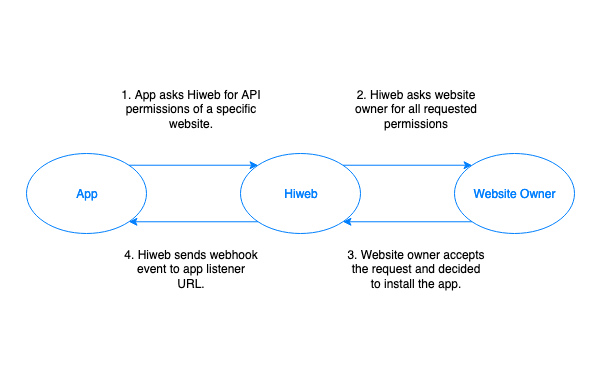
When a website installed your app, Hiweb will create an access token and dispatch a webhook event to your app's listener URL. You can use this token to read/write data from Hiweb Website API (https://[client].hiweb.io/api/)
The diagram below describes how it works:
# Create app
To create an app:
- Login to your developer dashboard, click Apps > Create
- Provide app name, app permissions and app listener URL.
- Click Create app and you'll be redirected to app's overview page. From here you can view your
App IDandSecret key
# Send authenticated requests
Once a website installed your app, Hiweb will send a HTTP POST request to your listener URL. This request contains a JSON payload (app_tokens resource document), the payload will contain a "token" string and approved scopes. Below is an example of request payload:
{
  "data": {
    "type": "app_tokens",
    "attributes": {
	  "website_id": "...",
      "status": "active",
      "token": "LReFdNhg3QS562BoxZud49lyPJGha5XVR2PzsQXqUB5BE22IyvXdkLCGFZKl",
      "scopes": [
        "addresses.view",
        "addresses.viewAny",
        "addresses.create",
        "addresses.update",
        "addresses.delete",
        "carts.view",
        "carts.viewAny",
        "carts.create",
        "carts.update",
        "carts.delete",
        "cart_items.view",
        "cart_items.create",
        "cart_items.update",
        "cart_items.delete"
      ],
      "webhooks": [
        "products.update",
        "products.create",
        "posts.delete",
        "posts.update"
      ],
      "expires_at": "2021-05-23T19:20:23.110000Z",
      "created_at": "2020-05-23T19:20:23.110000Z",
      "updated_at": "2020-05-23T19:20:23.110000Z"
    },
    "id": "aa6d80db-f48b-4378-acce-3bd545ef4205",
    "relationships": {
      "app": {
        "data": {
          "id": "2caa4157-2bb2-40a3-9e6d-28066778f6a9",
          "type": "apps"
        }
      }
    }
  }
}
You can use this token to consume website API:
Endpoint:
https://hiweb.io/api/
All requests come from your app must include these following headers:
- Hiweb-Website-Id: [WEBSITE-ID]
- Hiweb-App-Id: [APP-ID]
- Authorization: Bearer [ACCESS-TOKEN]
# Verify embedded requests
Hiweb allows your app to have its own management web view by embedding your app's "Manage URL" as an iframe.
Hiweb will inject some GET params to help you identify the website and verify the request. Those parameters are:
| Param | Description |
|---|---|
| website_id | Website ID |
| signature_time | (Integer) The request time |
| signature | Signature string to verify this request |
You must calculate a signature from your end and compare with the signature from GET request. The signature can be calculated using hmac-256 algorithm:
SIGNATURE_TIME_HASH = HMAC-SHA256(website_id, signature_time)
SIGNATURE = HMAC-SHA256(SIGNATURE_TIME_HASH, APP_SECRET_KEY)